


Cruise Control
WARNING
Cruise control can be dangerous where you cannot drive safely at a steady speed. So, do not use the cruise control on winding roads or in heavy traffic.
Cruise control can be dangerous on slippery roads. On such roads, fast changes in tire traction can cause excessive wheel slip, and you could lose control. Do not use cruise control on slippery roads.
For vehicles with cruise control, a speed of about 40 km/h (25 mph) or more can be maintained without keeping your foot on the accelerator. Cruise control does not work at speeds below about 40 km/h (25 mph).
When the brakes are applied, cruise control is turned off.
For vehicles with an Allison or Hydra-Matic 6-speed automatic transmission, see “Grade Braking” under Tow/Haul Mode on page 9‑42 for an explanation of how cruise control interacts with the Range Selection Mode, tow/haul and grade braking systems.
For vehicles with the StabiliTrak system that begins to limit wheel spin while you are using cruise control, the cruise control will automatically disengage. See StabiliTrak® System on page 9‑59.
When road conditions allow the cruise control to be safely used again, it can be turned back on.
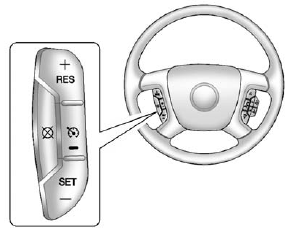
 (On/Off):
Press to turn the system on or off. The indicator light is on when cruise control is on and turns off when cruise control is off.
(On/Off):
Press to turn the system on or off. The indicator light is on when cruise control is on and turns off when cruise control is off.
+ RES (Resume/Accelerate):
Press briefly to resume to a previously set speed, or press and hold to accelerate.
SET − (Set/Coast): Press to set the speed and activate cruise control or make the vehicle decelerate.
 (Cancel): Press to disengage cruise control without erasing the set speed from memory.
See also:
Memory Seats
On vehicles with the memory feature, the “1” and “2” buttons on the outboard
side of the driver seat are used to manually save and recall the driver seat and
outside mirror positions. Th ...
Driving on Grades
Reduce speed and shift to a lower gear before starting down a long or steep downgrade. If the transmission is not shifted down, the brakes might get hot and no longer work well.
Vehicles can tow in D ...
Vehicle Speed Messages
SPEED LIMITED TO XXX MPH (KM/H)
This message displays when your vehicle speed is limited to 128 km/h (80 mph) because the vehicle detects a problem in the speed variable assist steering system.
Have ...