


Climate Control Systems (with Heater Only)
With this system the heating and ventilation can be controlled.
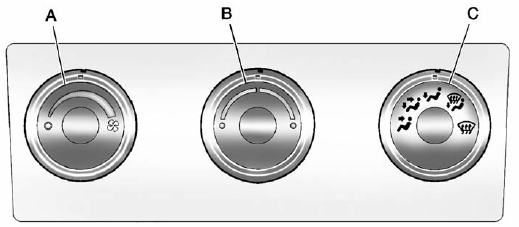 A. Fan Control
B. Temperature Control
C. Air Delivery Mode Control
Temperature Control: Turn clockwise or counterclockwise to increase or decrease the temperature inside the vehicle.
 (Fan Control): Turn clockwise or counterclockwise to increase or decrease the fan speed. Turn the knob all the way counterclockwise to turn the front system off.
Air Delivery Mode Control: Turn clockwise or counterclockwise to increase or decrease the temperature inside the vehicle. The knob can be positioned between two modes to select a combination of those modes.
Select from the following:
 (Vent): Air is directed to the instrument panel outlets.
 (Bi-Level): Air is divided between the instrument panel and floor outlets.
 (Floor): Air is directed to the floor outlets, with some air directed to the windshield, side window, and second row floor outlets. In this mode, the system automatically selects outside air.
 (Defog): This mode clears the windows of fog or moisture. Air is directed to the windshield, floor outlets, and side window vents.
 (Defrost): This mode removes fog or frost from the windshield more quickly. Air is directed to the windshield and the side window vents, with some air directed to the floor vents. The system automatically forces outside air into the vehicle.
Do not drive the vehicle until all the windows are clear.
See also:
Manual Seats
To adjust the seat:
1. Lift the bar to unlock the seat.
2. Slide the seat to the desired position and release the bar.
3. Try to move the seat back and forth to be sure the seat is locked in pl ...
Transferring Service
Push to request account transfer eligibility information. The Advisor can assist in canceling or removing account information. If OnStar receives information that vehicle ownership has changed, OnSta ...
Anti-theft Alarm System
On vehicles with an anti-theft alarm system, to activate the system:
• Press on the Remote Keyless Entry (RKE) transmitter or the power door lock switch when any door is open.
The security ligh ...