


Rear Safety Belt Comfort Guides
This vehicle may have rear shoulder belt comfort guides. If not, they are available through your dealer. The guides may provide added safety belt comfort for older children who have outgrown booster seats and for some adults. When installed and properly adjusted, the comfort guide positions the belt away from the neck and head.
Here is how to install a comfort guide to the shoulder belt:
1. Remove the guide from its storage clip on the interior body.
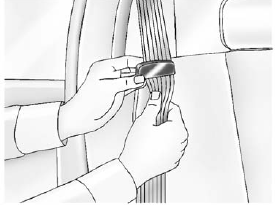
2. Place the guide over the belt and insert the two edges of the belt into the slots of the guide.
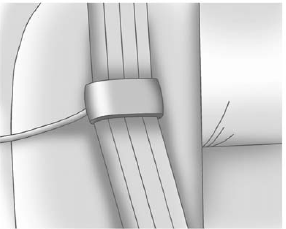
3. Be sure that the belt is not twisted and it lies flat. The elastic cord must be under the belt and the guide on top.
WARNING
A safety belt that is not properly worn may not provide the protection needed in a crash. The person wearing the belt could be seriously injured. The shoulder belt should go over the shoulder and across the chest. These parts of the body are best able to take belt restraining forces.
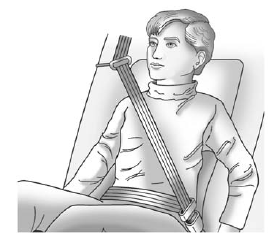
4. Buckle, position, and release the safety belt as described previously in this section. Make sure the shoulder portion of the belt is on the shoulder and not falling off of it. The belt should be close to, but not contacting, the neck.
To remove and store the comfort guide, squeeze the belt edges together so that the safety belt can be removed from the guide. Slide the guide onto the storage clip.
See also:
Flash-to-Pass
The flash&-to&-pass feature works with the low beams or Daytime Running Lamps
(DRL) on or off.
To flash the high beams, pull the turn signal/lane change lever all the way toward
you, then ...
Safety Belts
Refer to the following sections for important information on how to use safety
belts properly:
○ Safety Belts on page 3‑12.
○ How to Wear Safety Belts Properly on page 3‑ ...
Windows
Press the front of the switch to lower the window. Pull the switch up to raise
it.
Pushing or pulling the switch part of the way will open or close the window as
long as the switch is operated. ...