


Windows
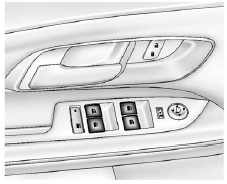
Press the front of the switch to lower the window. Pull the switch up to raise it.
Pushing or pulling the switch part of the way will open or close the window as long as the switch is operated.
See also:
Power Steering Fluid
The power steering fluid reservoir is located under the engine cover on the passenger side of the vehicle.
See Engine Compartment Overview on page 10‑6 for reservoir location. ...
Trailer Towing
Before pulling a trailer, there are three important considerations that have
to do with weight:
○ The weight of the trailer
○ The weight of the trailer tongue
○ The total weight ...
Engine Compartment Overview
A. Radiator Pressure Cap. See Cooling System on page 10‑14.
B. Engine Coolant Recovery Cap. See Cooling System on page 10‑14.
C. Remote Negative (−) Terminal. See Jump Starting o ...