


Safety Belts
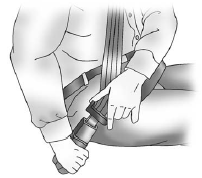
Refer to the following sections for important information on how to use safety belts properly:
○ Safety Belts on page 3‑12.
○ How to Wear Safety Belts Properly on page 3‑13.
○ Lap-Shoulder Belt on page 3‑15.
○ Lower Anchors and Tethers for Children (LATCH System) on page 3‑44.
See also:
When to Add Engine Oil
If the oil is below the cross-hatched area at the tip of the dipstick, add 1 L (1 qt) of the recommended oil and then recheck the level. See “Selecting the Right Engine Oil” in this section for ...
What to Use
WARNING
Adding only plain water or some other liquid to the cooling system can be dangerous. Plain water and other liquids, can boil before the proper coolant mixture will.
The coolant warning syste ...
Vehicle Overview
GMC’s full-size van sells in fewer numbers than the similar Chevrolet Express
but attracts a loyal clientele. Along with its full-size rivals from Dodge and
Ford, the rear-drive truck-based van ...