


Battery Replacement
Replace the battery if the REPLACE BATTERY IN REMOTE KEY message displays in the DIC.
Notice: When replacing the battery, do not touch any of the circuitry on the transmitter. Static from your body could damage the transmitter.
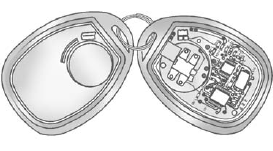
To replace the battery:
1. Separate the transmitter with a flat, thin object, such as a flat head screwdriver.
• Carefully insert the tool into the notch located along the parting line of the transmitter. Do not insert the tool too far. Stop as soon as resistance is felt.
• Twist the tool until the transmitter is separated.
2. Remove the old battery. Do not use a metal object.
3. Insert the new battery, positive side facing down. Replace with a CR2032 or equivalent battery.
4. Snap the transmitter back together.
See also:
Driver Information Center (DIC)
The DIC display is located at the bottom of the instrument panel cluster. It shows the status of many vehicle systems and enables access to the personalization menu.
The DIC buttons are located on ...
Airbag On-Off Switch
If one of the switches pictured in the following illustrations is located in the glove box, the vehicle has an airbag on-off switch that you can use to manually turn on or off the right front passenge ...
Emissions Inspection and Maintenance Programs
Some local governments may have programs to inspect the on-vehicle emission control equipment.
For the inspection, the emission system test equipment is connected to the vehicle’s Data Link Connect ...