


Rear Seat Audio (RSA) System
For vehicles with Rear Seat Audio (RSA), rear seat passengers can listen to and control any of the music sources: radio, CDs, DVDs, or other auxiliary sources. The rear seat passengers can only control the music sources the front seat passengers are not listening to (except on some radios where dual control is allowed). For example, rear seat passengers can control a CD and listen to it through the headphones, while the driver listens to the radio through the front speakers. The rear seat passengers have control of the volume for each set of headphones.
The RSA functions operate even when the main radio is off. The front audio system displays  when the RSA is on, and disappears from the display when it is off.
Audio can be heard through wired headphones (not included) plugged into the jacks on the RSA. If the vehicle has this feature, audio can also be heard on Channel 2 of the wireless headphones.
The audio system mutes the rear speakers when the RSA audio is active through the headphones.
To listen to an iPod or portable audio device through the RSA, attach the iPod or portable audio device to the front auxiliary input (if available), located on the front audio system. Turn the iPod on, then choose the front auxiliary input with the RSA SRCE button.
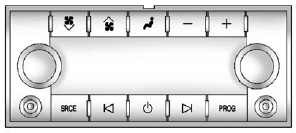
 (Power): Press to turn the RSA on or off.
Volume: To increase or decrease headphone volume, turn the knobs located next to the SRCE or PROG buttons. The left knob controls the left headphones and the right knob controls the right headphones.
SRCE (Source): Press to select between the radio (AM/FM), CD, and if the vehicle has these features, DVD, front auxiliary, and rear auxiliary.
 (Seek): Press to go to the previous or next station and stay there. This function is inactive, with some radios, if the front seat passengers are listening to the radio.
Press and hold  or
or  until the display flashes to tune to an individual station. The display stops flashing after the buttons have not been pushed for more than two seconds. This function is inactive, with some radios, if the front seat passengers are listening to the radio.
While listening to a disc, press to go to the next track or chapter on the disc. Press to go back to the start of the current track or chapter (if more than 10 seconds have played). This function is inactive, with some radios, if the front seat passengers are listening to the disc.
When a DVD video menu is being displayed, press or
to perform a cursor up or down on the menu.
Hold or
to perform a cursor left or right on the menu.
PROG (Program): Press to go to the next preset radio station or channel set on the main radio.
This function is inactive, with some radios, if the front seat passengers are listening to the radio.
When a CD or DVD audio disc is playing, press PROG to go to the beginning of the CD or DVD audio.
This function is inactive, with some radios, if the front seat passengers are listening to the disc.
When a disc is playing in the CD or DVD changer, press PROG to select the next disc, if multiple discs are loaded. This function is inactive, with some radios, if the front seat passengers are listening to the disc.
When a DVD video menu is being displayed, press PROG to perform the ENTER menu function.
See also:
How to Wear Safety Belts Properly
This section is only for people of adult size.
There are special things to know about safety belts and children. And there are
different rules for smaller children and infants. If a child will be r ...
Satellite Radio
For vehicles equipped with the MyLink or IntelliLink infotainment system, see
the separate MyLink/ IntelliLink Features and Functions Guide for more information.
Vehicles with an XM™ Satellite Ra ...
Additional Maintenance and Care
Your vehicle is an important investment and caring for it properly may help to
avoid future costly repairs. To maintain vehicle performance, additional maintenance
services may be required. It is ...