


DIC Buttons
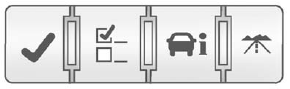
The buttons are the set/reset, customization, vehicle information, and trip/fuel buttons. The button functions are detailed in the following pages.
 (Set/Reset): Press this button to set or reset certain functions and to turn off or acknowledge messages on the DIC.
 (Customization): Press this button to customize the feature settings on your vehicle. See Vehicle Personalization (With DIC Buttons) on page 5‑46 for more information.
 (Vehicle Information): Press this button to display the oil life, park assist on vehicles with this feature, units, tire pressure readings on vehicles with this feature, and compass calibration and zone setting on vehicles with this feature.
 (Trip/Fuel): Press this button to display the odometer, trip odometers, fuel range, average economy, timer, fuel used, and average speed.
See also:
Engine Coolant Heater
The engine heater can provide easier starting and better fuel economy during engine warm-up in cold weather conditions at or below −18°C (0°F). Vehicles with an engine heater should be plugged ...
Lap-Shoulder Belt
If the vehicle is a regular cab, then all seating positions in the vehicle have a lap-shoulder belt. If the vehicle is a crew or extended cab, then all seating positions in the vehicle have a lap-shou ...
Battery
This display shows the current battery voltage. If the voltage is in the normal range, the value will display. For example, the display may read BATTERY 13 VOLTS.
Your vehicle's charging system regul ...