


Recommended Transfer Case Settings
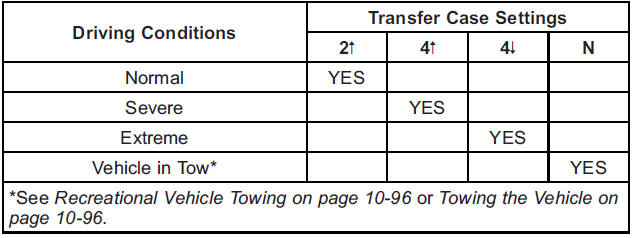
You can choose among four driving settings:
Indicator lights in the dial show which setting you are in. The indicator lights will come on briefly when you turn on the ignition and one will stay on. If the lights do not come on, you should take the vehicle to your dealer for service.
An indicator light flashes while shifting the transfer case and remains illuminated when the shift is complete. If for some reason the transfer case cannot make a requested shift, it will return to the last chosen setting.
2  (Two-Wheel Drive High): This setting is used for driving in most street and highway situations. The front axle is not engaged in Two-Wheel Drive. This setting also provides the best fuel economy.
4 (Four-Wheel Drive High): Use the Four-Wheel Drive High position when extra traction is needed, such as on snowy or icy roads or in most off-road situations. This setting also engages the front axle to help drive the vehicle. This is the best setting to use when plowing snow.
4  (Four-Wheel Drive Low): This setting also engages the front axle and delivers extra torque. You may never need this setting. It sends maximum power to all four wheels.
You might choose Four-Wheel Drive Low while driving off-road in deep sand, deep mud, deep snow, and while climbing or descending steep hills.
If the vehicle has StabiliTrak®, shifting into Four-Wheel Drive Low will turn Traction Control and StabiliTrak off. See StabiliTrak® System on page 9‑59.
WARNING
Shifting the transfer case to N (Neutral) can cause the vehicle to roll even if the transmission is in P (Park). You or someone else could be seriously injured. Be sure to set the parking brake before placing the transfer case in N (Neutral). See Parking Brake on page 9‑58.
N (Neutral): Shift the vehicle's transfer case to N (Neutral) only when towing the vehicle. See Recreational Vehicle Towing on page 10‑96 or Towing the Vehicle on page 10‑96 for more information.
If the SERVICE 4 WHEEL DRIVE message stays on, you should take the vehicle to your dealer for service. See “SERVICE 4 WHEEL DRIVE message” under Transmission Messages on page 5‑50.
See also:
Tire Sidewall Labeling
Useful information about a tire is molded into its sidewall. The examples show
a typical passenger vehicle tire and a compact spare tire sidewall.
Passenger (P&-Metric) Tire Example
(A) Tire ...
Engine Oil
To ensure proper engine performance and long life, careful attention must be paid to engine oil.
Following these simple, but important steps will help protect your investment:
• Always use engine ...
Cigarette Lighter
To use the cigarette lighter, push it in all the way, and let go. When it is ready for use, the lighter pops back out.
Notice: Holding a cigarette lighter in while it is heating does not let the ligh ...