


Rear Vision Camera Location
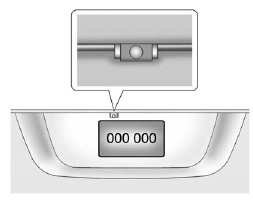
The camera is located above the license plate.
The area displayed by the camera is limited.
It does not display objects that are close to either corner or under the bumper and can vary depending on vehicle orientation or road conditions. The distance of the image that appears on the screen is different from the actual distance.
The following illustration shows the field of view that the camera provides.
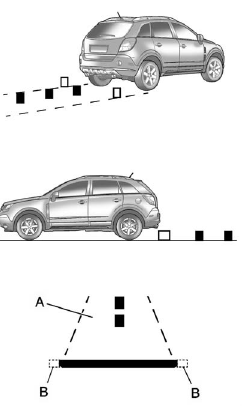
A. View displayed by the camera.
B. Corner of the rear bumper.
See also:
Using the “Delete” Command
1. Press and hold for two seconds.
2. Say “Delete.” 3. Say the name tag you want to delete. ...
Off-Road Recovery
The vehicle's right wheels can drop off the edge of a road onto the shoulder
while driving. Follow these tips:
1. Ease off the accelerator and then, if there is nothing in the way, steer the ...
Infotainment Control Buttons
The buttons on the faceplate are used to start primary functions while using
the infotainment system.
VOL/ (Volume/Power):
1. Press to turn the system on and off.
2. Turn to adjust the volume.
...