


Removing and Replacing the Floor Mat
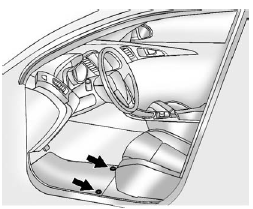
The driver side floor mat is held in place by two retainers.
1. Pull up on the rear of the floor mat to unlock each retainer and remove.
2. Reinstall by lining up the floor mat retainer openings over the carpet retainers
and snap into position.
3. Make sure the floor mat is properly secured and verify that it does not interfere
with the pedals.
See also:
Interior Care
To prevent dirt particle abrasions, regularly clean the vehicle's interior.
Immediately remove any soils. Note that newspapers or dark garments that can transfer color to home furnishings can also pe ...
Battery Replacement
Replace the battery if the REPLACE BATTERY IN REMOTE KEY message displays in the DIC.
Notice: When replacing the battery, do not touch any of the circuitry on the transmitter. Static from your body c ...
Fuel E85 (85% Ethanol)
Vehicles that have a FlexFuel badge and a yellow fuel cap can use either unleaded gasoline or ethanol fuel containing up to 85% ethanol (E85).
See Fuel E85 (85% Ethanol) on page 9‑76. For all o ...