


Engine Cover
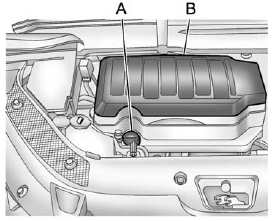
A. Oil Fill Cap
B. Engine Cover
To remove:
1. Remove the oil fill cap (A).
2. Raise the engine cover (B) to release it from the retainers.
3. Lift and remove the engine cover.
4. Reverse Steps 1 through 3 to reinstall engine cover.
See also:
Engine Coolant Heater
The engine heater can provide easier starting and better fuel economy during engine warm-up in cold weather conditions at or below −18°C (0°F). Vehicles with an engine heater should be plugged ...
Rear Window Wiper/Washer
The rear wiper controls are on the end of the windshield wiper lever.
ON: Press the upper portion of the button for continuous rear window wipes.
OFF: The rear wiper turns off when the button is r ...
Ending a Call
Press to end a call. ...