


Floor Console Storage
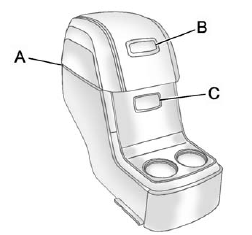
For vehicles with a second row center console, open each area to access the storage compartment inside.
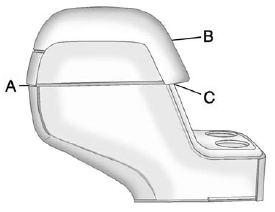
To access the upper storage area, press the upper button (B) and lift up. To access the lower storage area, press the lower button (C) and lift up. The top of the console can be folded forward for increased storage area. Lift up on the handle on the rear of the console (A) and pull forward.
WARNING
Never open more than one of the three latches at a time to help avoid personal injury and damage to the console.
Notice: Slide the front console as far forward as it will go before folding the second row console forward to help prevent damage to the consoles.
See also:
Under the Hood
The Savana may be equipped with one of four engines. Light-duty, RWD G-Series
vans have a 200-hp, 4.3-liter V-6 as the base engine. Three V-8s are available:
a 270-hp 4.8-liter, a 285-hp 5.3-liter ...
Dual Tone Multi-Frequency (DTMF) Tones
The Bluetooth system can send numbers and the numbers stored as name tags during a call. You can use this feature when calling a menu-driven phone system.
Account numbers can also be stored for use.
...
Vehicle and Power Issues
OnStar services require a vehicle electrical system, wireless service, and GPS satellite technologies to be available and operating for features to function properly. These systems may not operate if ...