


Engine Compartment Overview
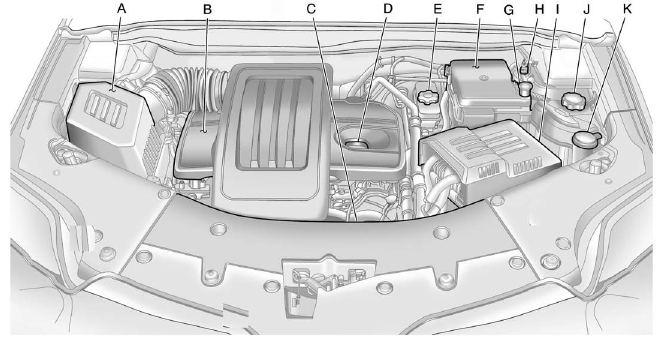
2.4L L4 Engine
A. Engine Air Cleaner/Filter on page 10‑14.
B. Engine Cover on page 10‑9.
C. Engine Oil Dipstick (Out of View). See Engine Oil on page 10‑10.
D. Engine Oil Fill Cap. See Engine Oil on page 10‑10.
E. Brake Fluid Reservoir. See Brakes on page 10‑23.
F. Engine Compartment Fuse Block on page 10‑38.
G. Remote Positive (+) Terminal. See Jump Starting on page 10‑76.
H. Remote Negative (−) Terminal. See Jump Starting on page 10‑76.
I. Battery on page 10‑26 (Out of View).
J. Engine Coolant Surge Tank and Pressure Cap. See Engine Coolant on page 10‑17.
K. Windshield Washer Fluid Reservoir. See Washer Fluid on page 10‑23.
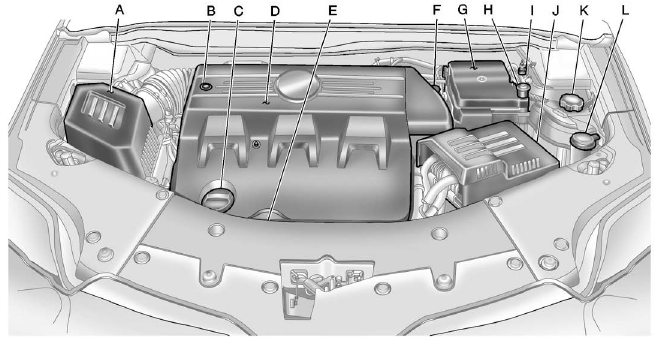
3.0L V6 Engine
A. Engine Air Cleaner/Filter on page 10‑14.
B. Power Steering Fluid Reservoir (Under Engine Cover). See Power Steering Fluid
(2.4L L4 Engine) on page 10‑22 or Power Steering Fluid (3.0L V6 Engine) on page
10‑22.
C. Engine Oil Fill Cap. See Engine Oil on page 10‑10.
D. Engine Cover on page 10‑9.
E. Engine Oil Dipstick (Out of View). See Engine Oil on page 10‑10.
F. Brake Fluid Reservoir. See Brakes on page 10‑23.
G. Engine Compartment Fuse Block on page 10‑38.
H. Remote Positive (+) Terminal. See Jump Starting on page 10‑76.
I. Remote Negative (−) Terminal. See Jump Starting on page 10‑76.
J. Battery on page 10‑26 (Out of View).
K. Engine Coolant Surge Tank and Pressure Cap. See Engine Coolant on page 10‑17.
L. Windshield Washer Fluid Reservoir. See Washer Fluid on page 10‑23.
See also:
Cargo Box & Towing
One benefit of the Canyon's low ride height is that the cargo box is very
accessible. Whether you have to lift something over the side of the box or load
something with the tailgate down, the low- ...
Windshield Wiper/Washer
Windshield Wiper/Washer
The front wiper control is located on the turn and lane-change lever.
The windshield wipers are controlled by turning the band with
on it.
: For a single wipe, turn to ...
Radio(s)
Radio with USB, CD, and DVD (MP3)
: Press to turn the system on and off. Turn to increase or decrease the volume.
BAND: Press to choose between FM, AM, or XM™, if equipped.
: Select ra ...