


Ignition Positions
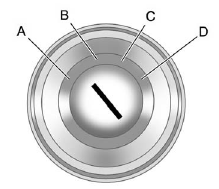
The ignition switch has four different positions.
Notice: Using a tool to force the key to turn in the ignition could cause damage to the switch or break the key. Use the correct key, make sure it is all the way in, and turn it only with your hand. If the key cannot be turned by hand, see your dealer.
The key must be fully extended to start the vehicle.
To shift out of P (Park), turn the ignition to ON/RUN and apply the brake pedal.
A (STOPPING THE ENGINE/ LOCK/OFF): When the vehicle is stopped, turn the ignition switch to LOCK/OFF to turn the engine off. Retained Accessory Power (RAP) will remain active. See Retained Accessory Power (RAP) on page 9‑25.
This is the only position from which the key can be removed. This locks the steering wheel, ignition and automatic transmission.
Do not turn the engine off when the vehicle is moving. This will cause a loss of power assist in the brake and steering systems and disable the airbags.
If the vehicle must be shut off in an emergency:
1. Brake using a firm and steady pressure. Do not pump the brakes repeatedly. This may deplete power assist, requiring increased brake pedal force.
2. Shift the vehicle to N (Neutral). This can be done while the vehicle is moving. After shifting to N (Neutral), firmly apply the brakes and steer the vehicle to a safe location.
3. Come to a complete stop, shift to P (Park), and turn the ignition to LOCK/OFF. On vehicles with an automatic transmission, the shift lever must be in P (Park) to turn the ignition switch to the LOCK/OFF position.
4. Set the parking brake. See Parking Brake on page 9‑33.
WARNING
Turning off the vehicle while moving may cause loss of power assist in the brake and steering systems and disable the airbags. While driving, only shut the vehicle off in an emergency.
If the vehicle cannot be pulled over, and must be shut off while driving, turn the ignition to ACC/ ACCESSORY.
The ignition switch can bind in the LOCK/OFF position with the wheels turned off center. If this happens, move the steering wheel from right to left while turning the key to ACC/ ACCESSORY. If this does not work, then the vehicle needs service.
B (ACC/ACCESSORY): This position provides power to some of the electrical accessories. It unlocks the steering wheel and ignition. To move the key from ACC/ ACCESSORY to LOCK/OFF, push in the key and then turn it to LOCK/OFF.
C (ON/RUN): The ignition switch stays in this position when the engine is running. This position can be used to operate the electrical accessories, including the ventilation fan and 12&-volt power outlets, as well as to display some warning and indicator lights. This position can also be used for service and diagnostics, and to verify the proper operation of the malfunction indicator lamp as may be required for emission inspection purposes. The transmission is also unlocked in this position on automatic transmission vehicles.
The battery could be drained if the key is left in the ACC/ACCESSORY or ON/RUN position with the engine off. The vehicle might not start if the battery is allowed to drain for an extended period of time.
D (START): This position starts the engine. When the engine starts, release the key. The ignition switch will return to ON/RUN for normal driving.
A warning tone sounds when the driver door is opened if the ignition is still in ACC/ACCESSORY and the key is in the ignition.
See also:
Off-Road Recovery
The vehicle's right wheels can drop off the edge of a road onto the shoulder while driving.
Follow these tips:
1. Ease off the accelerator and then, if there is nothing in the way, steer the vehic ...
Sunroof
On vehicles with a sunroof, the switches used to operate it are on the headliner
above the rearview mirror. The ignition must be in ON/ RUN or ACC/ACCESSORY, or
in Retained Accessory Power (RAP) t ...
CD-R or CD-RW Supported File and Folder Structure
The DVD player supports:
• Up to 255 folders.
• Up to eight folders in depth.
• Up to 15 playlists.
• Up to 40 sessions.
• Playlists with an .m3u or .wpl extension.
• Files with an . ...