


Lumbar Adjustment
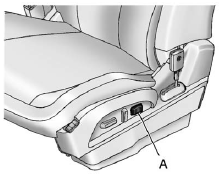
Eight-Way Power Seat Shown, Four-Way Similar
A. Lumbar Switch
If available, press and hold the front or rear of the switch (A) to increase or decrease lumbar support. Release the switch when the seatback reaches the desired level of lumbar support.
See Lumbar Adjustment on page 3‑5 for more information.
See also:
Engine Power Messages
ENGINE POWER IS REDUCED
This message displays and a chime sounds when the cooling system temperature gets too hot and the engine further enters the engine coolant protection mode.
See Engine Overhea ...
Vehicle Messages
Messages are displayed on the DIC to notify the driver that the status of the
vehicle has changed and that some action may be needed by the driver to correct
the condition. Multiple messages may a ...
TPMS Malfunction Light and Message
The TPMS will not function properly if one or more of the TPMS sensors are missing or inoperable. When the system detects a malfunction, the low tire pressure warning light flashes for about one minut ...