


Engine Cover
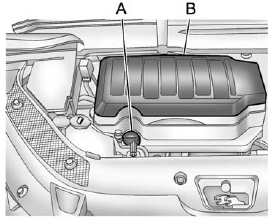
A. Oil Fill Cap
B. Engine Cover
To remove:
1. Remove the oil fill cap (A).
2. Raise the engine cover (B) to release it from the retainers.
3. Lift and remove the engine cover.
4. Reverse Steps 1 through 3 to reinstall engine cover.
See also:
Transportation Options
Warranty service can generally be completed while you wait. However, if you are unable to wait, GM helps to minimize inconvenience by providing several transportation options. Depending on the circums ...
Driver Information Center (DIC) (With DIC Buttons)
If your vehicle has DIC buttons, the information below explains the operation of this system.
The DIC displays information about your vehicle. It also displays warning messages if a system problem is ...
Following Distance
Stay at least twice as far behind the vehicle ahead as you would when driving
the vehicle without a trailer. This can help to avoid situations that require heavy
braking and sudden turns. ...