


Compass Variance (Zone) Procedure
1. Do not set the compass zone when the vehicle is moving.
Only set it when the vehicle is in P (Park).
Press the vehicle information button until PRESS  TO CHANGE COMPASS ZONE displays.
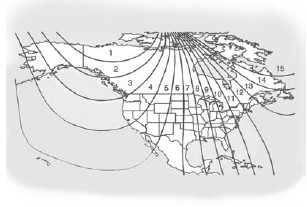
2. Find the vehicle's current location and variance zone number on the map.
Zones 1 through 15 are available.
3. Press the set/reset button to scroll through and select the appropriate variance zone.
4. Press the trip/fuel button until the vehicle heading, for example, N for North, is displayed in the DIC.
5. If calibration is necessary, calibrate the compass.
See “Compass Calibration Procedure” following.
See also:
General Towing Information
Only use towing equipment that has been designed for the vehicle. Contact your
dealer or trailering dealer for assistance with preparing the vehicle for towing
a trailer. See the following trailer ...
Engine Overheating
The vehicle has an indicator to warn of engine overheating. There is an engine
coolant temperature warning light on the vehicle's instrument panel. See Engine
Coolant Temperature Gauge on page ...
Control of a Vehicle
Braking, steering, and accelerating are important factors in helping to control a vehicle while driving. ...