


Heated and Ventilated Front Seats
WARNING
If you cannot feel temperature change or pain to the skin, the seat heater may cause burns even at low temperatures.
To reduce the risk of burns, people with such a condition should use care when using the seat heater, especially for long periods of time. Do not place anything on the seat that insulates against heat, such as a blanket, cushion, cover, or similar item. This may cause the seat heater to overheat.
An overheated seat heater may cause a burn or may damage the seat.
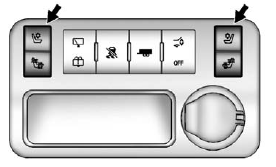
Heated and Cooled Seat Buttons Shown, Heated Seat Buttons Similar
If available, the buttons are on the center console. To operate, the engine must be running.
 (Heated Seatback): If available, press to heat the seatback only.
 (Cooled Seat): If available, press to cool the entire seat.
 (Heated Seat and Seatback):
Press to heat the seat and seatback.
Press the button once for the highest setting. With each press of the button, the seat will change to the next lower setting, and then to the off setting. The lights indicate three for the highest setting and one for the lowest.
The passenger heated seat may take longer to heat up.
The heated and/or cooled seats are canceled after the ignition is turned off.
Remote Start Heated Seats
When it is cold outside, the heated seats may turn on automatically during a remote vehicle start.
The heated seats will be canceled when the ignition is turned on. Press the desired heated seat button to use the heated seats after the vehicle is started.
The heated seat button lights will not turn on during a remote start.
The temperature of an unoccupied seat may be reduced.
See Remote Vehicle Start on page 2‑5 for more information.
See also:
Instrument Panel
Instrument Panel
A. Air Vents on page 8‑12.
B. Windshield Wiper/Washer on page 5‑5.
C. Instrument Cluster on page 5‑12.
D. Head-Up Display (HUD) on page 5‑33 (If Equipp ...
Maintenance When Trailer Towing
The vehicle needs service more often when pulling a trailer. See this manual's
Maintenance Schedule or Index for more information. Things that are especially important
in trailer operation are ...
Languages
The vehicle can be programmed to respond in French or Spanish. Push and ask an Advisor. Advisors can speak French or Spanish. ...