


DIC Buttons
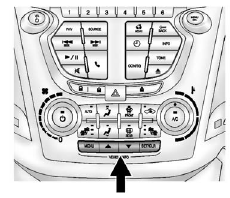
MENU: Press this button to get to the Trip/Fuel Menu and the Vehicle Information Menu.
 : Use these buttons to scroll through
the items in each menu. A small marker will move along the page as you scroll through
the items. This shows where each page is in the menu.
: Use these buttons to scroll through
the items in each menu. A small marker will move along the page as you scroll through
the items. This shows where each page is in the menu.
SET/CLR (Set/Clear): Use this button to set or clear the menu item when it is displayed.
See also:
Radio(s)
Radio with USB, CD, and DVD (MP3)
: Press to turn the system on and off. Turn to increase or decrease the volume.
BAND: Press to choose between FM, AM, or XM™, if equipped.
: Select ra ...
Courtesy Lamps
The courtesy lamps automatically come on when a door is opened.
The lamps can also be turned on manually by fully turning the instrument panel brightness control clockwise.
The reading lamps, locate ...
Adding or Removing Categories
1. From the Home Page press the Config screen button or the CONFIG button on
the faceplate.
2. Select Radio Settings from the Config Menu list.
3. Select Add/Remove XM Categories.
4. From the Add ...