


Passenger Airbag Status Indicator
The vehicle has a passenger sensing system. See Passenger Sensing System on page 3‑28 for important safety information. The overhead console has a passenger airbag status indicator.
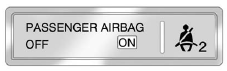
United States
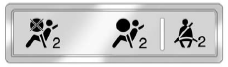
Canada and Mexico
When the vehicle is started, the passenger airbag status indicator will light ON and OFF, or the symbol for on and off, for several seconds as a system check. If you are using remote start, if equipped, to start the vehicle from a distance, you may not see the system check. Then, after several more seconds, the status indicator will light either ON or OFF, or either the on or off symbol to let you know the status of the right front passenger frontal airbag.
If the word ON or the on symbol is lit on the passenger airbag status indicator, it means that the right front passenger frontal airbag is enabled (may inflate).
If the word OFF or the off symbol is lit on the passenger airbag status indicator, it means that the passenger sensing system has turned off the right front passenger frontal airbag.If, after several seconds, both status indicator lights remain on, or if there are no lights at all, there may be a problem with the lights or the passenger sensing system. See your dealer for service.
WARNING
If the airbag readiness light ever comes on and stays on, it means that something may be wrong with the airbag system. To help avoid injury to yourself or others, have the vehicle serviced right away. See Airbag Readiness Light on page 5‑11 for more information, including important safety information.
See also:
2011 GMC Sierra 2500HD Review
The "professional grade" brand unveiled the 2011 GMC Sierra Heavy Duty lineup
at the 2010 NTEA Work Truck Show. Most of the technical specifications of GM's
HD pickups are identical, but ...
Interior Glass
To clean, use a terry cloth fabric dampened with water. Wipe droplets left behind with a clean dry cloth.
Commercial glass cleaners may be used, if necessary, after cleaning the interior glass with p ...
Power Liftgate 3/4 Mode
To program the liftgate opening height:
1. Turn the liftgate switch to either the MAX , or the 3/4 mode position and
power open the liftgate.
2. Stop the liftgate movement at the desired height by ...