


How to Wear Safety Belts Properly
This section is only for people of adult size.
There are special things to know about safety belts and children. And there are different rules for smaller children and infants. If a child will be riding in the vehicle, see Older Children on page 3‑35 or Infants and Young Children on page 3‑37. Follow those rules for everyone's protection.
It is very important for all occupants to buckle up. Statistics show that unbelted people are hurt more often in crashes than those who are wearing safety belts.
There are important things to know about wearing a safety belt properly.
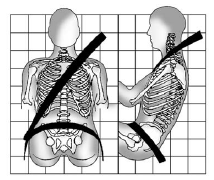
○ Sit up straight and always keep your feet on the floor in front of you.
○ Always use the correct buckle for your seating position.
○ Wear the lap part of the belt low and snug on the hips, just touching the thighs.
In a crash, this applies force to the strong pelvic bones and you would be less
likely to slide under the lap belt. If you slid under it, the belt would apply force
on your abdomen. This could cause serious or even fatal injuries.
○ Wear the shoulder belt over the shoulder and across the chest. These parts of
the body are best able to take belt restraining forces. The shoulder belt locks
if there is a sudden stop or crash.
WARNING
You can be seriously injured, or even killed, by not wearing your safety belt properly.
○ Never allow the lap or shoulder belt to become loose or twisted.
○ Never wear the shoulder belt under both arms or behind your back.
○ Never route the lap or shoulder belt over an armrest.
See also:
OnStar®
If equipped, this vehicle has a comprehensive, in-vehicle system that can connect
to a live Advisor for Emergency, Security, Navigation, Connection, and Diagnostic
Services. See OnStar Overview on ...
New for 2011
The Sierra Hybrid gets GM's OnStar 9.0 telematics system that GM says
provides better voice recognition. GM also said they have worked to cut down on
the amount of wind noise occupants hear. ...
Older Children
Older children who have outgrown booster seats should wear the vehicle safety
belts.
The manufacturer's instructions that come with the booster seat state the weight
and height limitations ...