


Audio/Video (A/V) Jacks
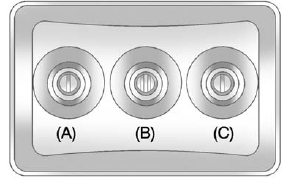 A. Yellow: Video Input
B. White: Left Audio Input
C. Red: Right Audio Input
The A/V jacks are color coded to match typical home entertainment system equipment.
The A/V jacks, located on the rear of the floor console, allow audio or video signals to be connected from an auxiliary device such as a camcorder or a video game unit to the RSE system. Adapter connectors or cables (not included) may be required to connect the auxiliary device to the A/V jacks.
Refer to the manufacturer’s instructions for proper usage.
Power for auxiliary devices is not supplied by the radio system.
To use the auxiliary inputs of the RSE system, connect an external auxiliary device to the color-coded A/V jacks and turn both the auxiliary device and the video screen power on. If the video screen is in the DVD player mode, pressing the AUX (auxiliary) button on the remote control switches the video screen from the DVD player mode to the auxiliary device. The audio of the connected source can be listened to over the speakers by sourcing the radio to the auxiliary device or by sourcing the RSA to the Rear Aux and listening with the wireless headphones on Channel 2 or with the wired headphones. See “Using the Auxiliary Input Jack” under Auxiliary Devices on page 7‑33 for more information about changing the source.
See also:
Replacement Bulbs
For replacement bulbs not listed here, contact your dealer. ...
Replacing Safety Belt System Parts after a Crash
WARNING
A crash can damage the safety belt system in the vehicle. A damaged safety belt
system may not properly protect the person using it, resulting in serious injury
or even death in a crash. ...
Floor Mats
WARNING
If a floor mat is the wrong size or is not properly installed, it can interfere
with the pedals. Interference with the pedals can cause unintended acceleration
and/or increased stopping d ...