


Lumbar Adjustment
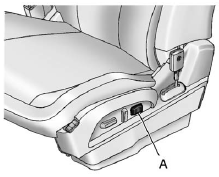
Eight-Way Power Seat Shown, Four-Way Similar
A. Lumbar Switch
If available, press and hold the front or rear of the switch (A) to increase or decrease lumbar support. Release the switch when the seatback reaches the desired level of lumbar support.
See Lumbar Adjustment on page 3‑5 for more information.
See also:
Engine Oil Life System
The engine oil life system calculates engine oil life based on vehicle use and
displays the CHANGE ENGINE OIL SOON message when it is time to change the engine
oil and filter. The oil life system ...
Ending a Call
Press to end a call. ...
Security
OnStar provides services like Stolen Vehicle Assistance, Remote Ignition Block, and Roadside Assistance, if the vehicle is equipped with these services. OnStar can unlock the vehicle doors remotely, i ...