


Compass Variance (Zone) Procedure
1. Do not set the compass zone when the vehicle is moving. Only set it when the vehicle is in P (Park).
Press the vehicle information button until PRESS  TO CHANGE COMPASS ZONE displays. Or, if the vehicle does not have DIC buttons, press the trip odometer reset stem until CHANGE COMPASS ZONE displays.
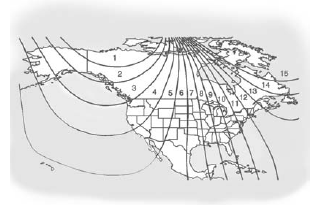
2. Find the vehicle's current location and variance zone number on the map.
Zones 1 through 15 are available.
3. Press the set/reset button to scroll through and select the appropriate variance zone.
4. Press the trip/fuel button until the vehicle heading, for example, N for North, is displayed in the DIC. Or, if the vehicle does not have DIC buttons, press and hold the trip odometer reset stem for two seconds to select the next available variance zone. Repeat this step until the appropriate variance zone is displayed.
5. If calibration is necessary, calibrate the compass. See “Compass Calibration Procedure” following.
See also:
Windshield Wiper/Washer
The front wiper control is located on the turn and lane-change lever.
The windshield wipers are controlled by turning the band with
on it.
(Mist): For
a single wipe, turn to , then
release ...
Filling a Portable Fuel Container
WARNING
Never fill a portable fuel container while it is in the vehicle. Static electricity discharge from the container can ignite the fuel vapor. You can be badly burned and the vehicle damaged if ...
Immobilizer
See Radio Frequency Statement on page 13‑22 for information regarding Part 15 of the Federal Communications Commission (FCC) rules and Industry Canada Standards RSS-GEN/210/220/310. ...