


Range Selection Mode
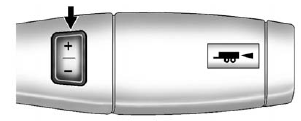
Range Selection Mode
The Range Selection Mode switch, if equipped, is located on the shift lever.
To enable the Range Selection feature:
1. Move the column shift lever to the M(Manual) position. The current range will appear next to the M. This is the highest attainable range with all lower gears accessible. As an example, when 5 (Fifth) gear is selected, 1 (First) through 5 (Fifth) gears are available.
2. Press the plus/minus buttons, located on the steering column shift lever, to select the desired range of gears for current driving conditions. See Manual Mode on page 9‑41.
While using Range Selection Mode, cruise control and the Tow/Haul mode can be used.
Grade Braking is not available when Range Selection Mode is active.
See Tow/Haul Mode on page 9‑42.
See also:
Cargo Tie-Downs
Four cargo tie-downs are located in the rear compartment of the vehicle.
The tie-downs can be used to secure small loads. ...
Braking
Braking action involves perception time and reaction time. Deciding to push the
brake pedal is perception time. Actually doing it is reaction time.
Average driver reaction time is about three&- ...
California Proposition 65 Warning
Most motor vehicles, including this one, contain and/or emit chemicals known to the State of California to cause cancer and birth defects or other reproductive harm. Engine exhaust, many parts and sys ...