


Removing and Replacing the Floor Mat
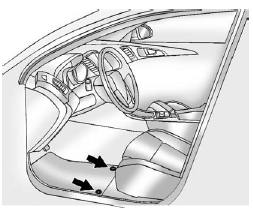
The driver side floor mat is held in place by two retainers.
1. Pull up on the rear of the floor mat to unlock each retainer and remove.
2. Reinstall by lining up the floor mat retainer openings over the carpet retainers
and snap into position.
3. Make sure the floor mat is properly secured and verify that it does not interfere
with the pedals.
See also:
CD-R or CD-RW Supported File and Folder Structure
The DVD Player supports:
• Up to 255 folders.
• Up to eight folders in depth.
• Up to 15 playlists.
• Up to 40 sessions.
• Playlists with an .m3u or .wpl extension.
• Files with an . ...
Shifting Out of Neutral
To shift out of N (Neutral) do the following:
1. Set the parking brake and apply the regular brake pedal.
2. Turn the ignition to ON/RUN with the engine off, and shift the transmission to N (Neutral ...
Preprogrammed Playlists
Preprogrammed playlists that were created using WinAmp™, MusicMatch™, or Real Jukebox™ software can be accessed; however, they cannot be edited using the radio. These playlists are treated as sp ...