


Armrest Retaining Strap
WARNING
A rear center armrest that is not properly stowed and secured could fall forward during a sudden stop or collision. The armrest could contact an infant secured in a rear&-facing child restraint in the center seat position. Fasten the retaining strap onto the stowed armrest before installing a rearfacing child restraint in the rear center seat position.
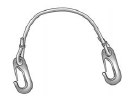
When new, the vehicle's glove box materials included an armrest retaining strap. Use it to secure the center armrest before installing a rear&-facing child restraint in the second row center seat position.
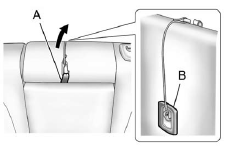
Stow the rear seat center armrest. Attach the retaining strap to the armrest loop (A) and to the center top tether anchor on the seatback (B). Make sure the retaining strap's clips are firmly attached.
Install the rear-facing child restraint using the child restraint manufacturer's instructions and the instructions described previously. Remove the armrest retaining strap before installing a forward facing child restraint in the center seat position, as it may interfere with the attachment of the top tether to the top tether anchor on the seatback.
See also:
Questions and Answers About Safety Belts
Q: Will I be trapped in the vehicle after a crash if I am wearing a safety belt?
A: You could be— whether you are wearing a safety belt or not.
Your chance of being conscious during and after a cr ...
Radio Reception
Frequency interference and static can occur during normal radio reception if items such as cell phone chargers, vehicle convenience accessories, and external electronic devices are plugged into the ac ...
Leaving the Vehicle with the Engine Running
WARNING
It can be dangerous to leave the vehicle with the engine running.
The vehicle could move suddenly if the shift lever is not fully in P (Park) with the parking brake firmly set. And, if you l ...