


Lumbar Adjustment
Power Lumbar
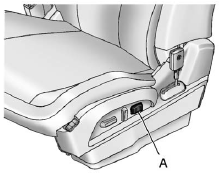
Eight-Way Power Seat Shown, Four-Way Similar
A. Lumbar Switch
If available, press and hold the front or rear of the switch (A) to increase or decrease lumbar support. Release the switch when the seatback reaches the desired level of lumbar support.
See also:
Low Fuel Warning Light
English Shown, Metric Similar
This light comes on for a few seconds when the ignition is turned on as a check
to indicate it is working. If it does not come on, have it fixed.
The low fuel warni ...
Returning the Seat to the Seating Position
To return the second row seat to its normal seating position:
1. Remove objects on the floor behind the second row seat or in the seat tracks on the floor.
2. Pull the seatback rearward until it is ...
Cleaning the Mirror
Do not spray glass cleaner directly on the mirror. Use a soft towel dampened
with water. ...