


Lumbar Adjustment
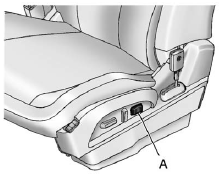
Eight-Way Power Seat Shown, Four-Way Similar
A. Lumbar Switch
If available, press and hold the front or rear of the switch (A) to increase or decrease lumbar support. Release the switch when the seatback reaches the desired level of lumbar support.
See Lumbar Adjustment on page 3‑5 for more information.
See also:
Accessories and Modifications
Adding non-dealer accessories or making modifications to the vehicle can affect vehicle performance and safety, including such things as airbags, braking, stability, ride and handling, emissions syste ...
Lamps
Properly working headlamps, taillamps, and brake lamps are important to see and be seen on the road.
• Signs that the headlamps need attention include dimming, failure to light, cracking, or damage ...
Chemical Paint Spotting
Airborne pollutants can fall upon and attack painted vehicle surfaces causing blotchy, ring-shaped discolorations, and small, irregular dark spots etched into the paint surface. ...