


Turn and Lane-Change Signals
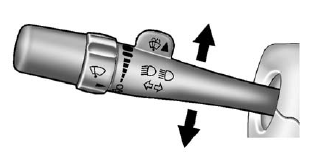
An arrow on the instrument panel cluster flashes in the direction of the turn or lane change.
Move the lever all the way up or down to signal a turn.
Raise or lower the lever for less than one second until the arrow starts to flash to signal a lane change. This causes the turn signals to automatically flash three times. It will flash six times if tow-haul mode is active. Holding the turn signal lever for more than one second will cause the turn signals to flash until you release the lever.
The lever returns to its starting position whenever it is released.
If after signaling a turn or a lane change the arrows flash rapidly or do not come on, a signal bulb could be burned out.
Have the bulbs replaced. If the bulb is not burned out, check the fuse.
See Fuses and Circuit Breakers on page 10‑47.
Turn Signal On Chime
If the turn signal is left on for more than 1.2 km (0.75 mi), a chime will sound at each flash of the turn signal and the message TURN SIGNAL ON will also appear in the Driver Information Control (DIC). To turn the chime and message off, move the turn signal lever to the off position.
See also:
DIC Operation and Displays
Use the DIC buttons located in the center of the instrument panel to access different
displays. The DIC displays trip, fuel, vehicle system information, and warning messages.
It also shows the shi ...
Tires
Tires need to be properly inflated, rotated, and balanced. Maintaining the tires can save money, fuel, and can reduce the risk of tire failure.
• Signs that the tires need to be replaced include th ...
Overview
GMC announced the all-new 2007 Acadia. It is GMC's first crossover,
delivering a smooth, responsive driving experience, athletic design, a spacious
interior and a comprehensive safety package to t ...