


Windows
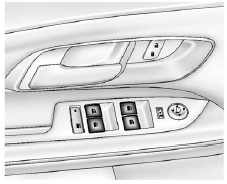
Press the front of the switch to lower the window. Pull the switch up to raise it.
Pushing or pulling the switch part of the way will open or close the window as long as the switch is operated.
See also:
Reducing Speed While Using Cruise Control
If the cruise control system is already activated, . Press and hold the SET– button on the steering wheel until the desired lower speed is reached, then release it.
• To slow down in small amount ...
Leaving the Vehicle With the Engine Running
WARNING
It can be dangerous to leave the vehicle with the engine running. The vehicle
could move suddenly if the shift lever is not fully in P (Park) with the parking
brake firmly set. And, if yo ...
Airbag On-Off Switch
If one of the switches pictured in the following illustrations is located in the glove box, the vehicle has an airbag on-off switch that you can use to manually turn on or off the right front passenge ...