


Head Restraints
The vehicle's front seats have adjustable head restraints in the outboard seating positions.
WARNING
With head restraints that are not installed and adjusted properly, there is a greater chance that occupants will suffer a neck/spinal injury in a crash.
Do not drive until the head restraints for all occupants are installed and adjusted properly.
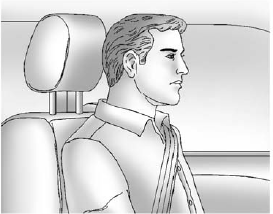
Adjust the head restraint so that the top of the restraint is at the same height as the top of the occupant's head. This position reduces the chance of a neck injury in a crash.
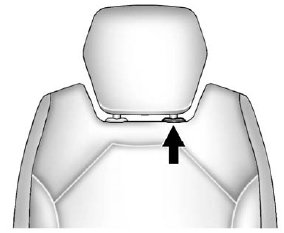
1. Pull the head restraint up to raise it. To lower the head restraint, press the release button, located on the head restraint post on the top of the seatback, while you push the head restraint down.
2. Push down on the head restraint after the button is released to make sure that it is locked in place.
The vehicle's second-row seats have head restraints in the outboard seating positions that cannot be adjusted.
The vehicle's third-row seats have headrests in the outboard seating positions that cannot be adjusted.
The vehicle's head restraints and headrests are not designed to be removed.
See also:
Sheet Metal Damage
If the vehicle is damaged and requires sheet metal repair or replacement, make sure the body repair shop applies anti-corrosion material to parts repaired or replaced to restore corrosion protection.
...
Cruise Control Messages
CRUISE SET TO XXX
This message displays whenever the cruise control is set. See Cruise Control on page 9‑32 for more information. ...
Powertrain details
The GMC Sierra All Terrain HD concept is propelled by the new, production
6.6L Duramax turbo-diesel V-8 and Allison 1000 six-speed automatic transmission
powertrain combination offered in the 2011 ...