


Remote Keyless Entry (RKE) System Operation
The Remote Keyless Entry (RKE) transmitter functions work up to 60m (195 ft) away from the vehicle.
There are other conditions which can affect the performance of the transmitter. See Remote Keyless Entry (RKE) System on page 2‑3.
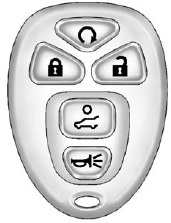
With Remote Start and Power Liftgate Shown, Without Similar
 (Remote Vehicle Start):
For vehicles with this feature, see Remote Vehicle Start on page 2‑5 for additional information.
 (Lock): Press to lock all the doors.
If enabled through the Driver Information Center (DIC), the parking lamps flash once to indicate locking has occurred. If enabled through the DIC, the horn sounds when is pressed again within five seconds. See Vehicle Personalization (With DIC Buttons) on page 5‑46 for additional information.
Pressing may arm the content theft-deterrent system.
See Anti-theft Alarm System on page 2‑13.
 (Unlock): Press once to unlock only the driver door. If is
pressed again within five seconds, all remaining doors unlock. The interior lamps come on and stay on for 20 seconds or until the ignition is turned on.
(Unlock): Press once to unlock only the driver door. If is
pressed again within five seconds, all remaining doors unlock. The interior lamps come on and stay on for 20 seconds or until the ignition is turned on.
If enabled through the DIC, the parking lamps flash twice to indicate unlocking has occurred. See Vehicle Personalization (With DIC Buttons) on page 5‑46.
Pressing on the RKE transmitter disarms the content theft-deterrent system. See Anti-theft Alarm System on page 2‑13.
 (Power Liftgate): Press and hold until the liftgate begins to move to open or close the liftgate.
The taillamps flash and a chime sounds to indicate when the liftgate is opening or closing.
 (Vehicle Locator/Panic Alarm): Press and release to locate the vehicle. The parking lamps flash and the horn sounds three times.
Press and hold for more than two seconds to activate the panic alarm. The parking lamps flash and the horn sounds repeatedly for 30 seconds. The alarm turns off when the ignition is moved to ON/RUN or is pressed again.
The ignition must be in LOCK/OFF for the panic alarm to work.
See also:
Four-Way Power Driver Seat
A. Seat Position Handle
B. Height Adjustment Control
To adjust the seat:
○ Move the seat forward or rearward using the handle under the front of the seat
cushion (A). See Seat Adjustment ...
Ending Cruise Control
There are three ways to end cruise control:
• Step lightly on the brake pedal.
• Press the button.
• To turn off the cruise control, press on the steering wheel. ...
Tire Inspection
We recommend that the tires, including the spare tire, if the vehicle has one, be inspected for signs of wear or damage at least once a month.
Replace the tire if:
• The indicators at three or mor ...