


Folding Mirrors
For vehicles with manual folding mirrors, push the mirror toward the vehicle. Pull the mirror out to return to its original position.
For vehicles with power folding mirrors:
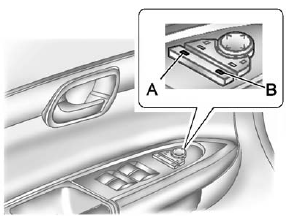
1. Press (A) to fold the mirrors out to the driving position.
2. Press (B) to fold the mirrors in to the folded position.
See Folding Mirrors on page 2‑17.
See also:
Powertrain details
The GMC Sierra All Terrain HD concept is propelled by the new, production
6.6L Duramax turbo-diesel V-8 and Allison 1000 six-speed automatic transmission
powertrain combination offered in the 2011 ...
Convex Mirrors
WARNING
A convex mirror can make things, like other vehicles, look farther away than they really are. If you cut too sharply into the right lane, you could hit a vehicle on the right. Check the insid ...
Cigarette Lighter
To use the cigarette lighter, push it in all the way, and let go. When it is ready for use, the lighter pops back out.
Notice: Holding a cigarette lighter in while it is heating does not let the ligh ...