


Lumbar Adjustment
Power Lumbar
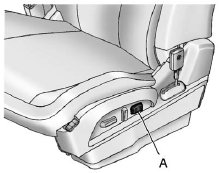
Eight-Way Power Seat Shown, Four-Way Similar
A. Lumbar Switch
If available, press and hold the front or rear of the switch (A) to increase or decrease lumbar support. Release the switch when the seatback reaches the desired level of lumbar support.
See also:
Engine Coolant Temperature Gauge
Metric
English
This gauge shows the engine coolant temperature. Under normal driving conditions the gauge will read approximately 100°C (210°F) or less. If the gauge pointer is near 125°C (26 ...
Initial Drive Information
This section provides a brief overview about some of the important features that
may or may not be on your specific vehicle. For more detailed information, refer
to each of the features which can ...
Safety Belts
This section of the manual describes how to use safety belts properly. It also describes some things not to do with safety belts.
WARNING
Do not let anyone ride where a safety belt cannot be worn pr ...