


Center Console Storage
Vehicles with an upper and lower center console storage area have cupholders included.
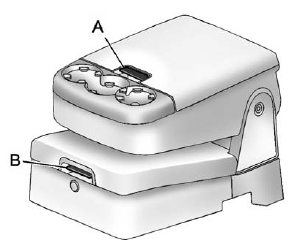
Pull the lever (A) up to access the upper storage area. Raise the upper storage bin, then pull the lever (B) up to access the lower storage area.
Use the key to lock and unlock the lower storage area.
See also:
Overview
GMC unveiled the all-new 2007 Yukon and Yukon Denali full-size SUVs Oct. 5.
They are based on GM's all-new full-size SUV family, which features distinctive
styling, spacious and refined interiors, ...
Speedometer
The speedometer shows how fast the vehicle is moving in either kilometers per hour (km/h) or miles per hour (mph). The speedometer cannot be reset. ...
Body Component Lubrication
Lubricate all key lock cylinders, hood hinges, liftgate hinges, and the steel
fuel door hinge unless the components are plastic. Applying silicone grease on weatherstrips
with a clean cloth will m ...