


Manual Seats
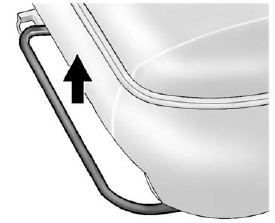
To adjust the seat:
1. Lift the bar to unlock the seat.
2. Slide the seat to the desired position and release the bar.
3. Try to move the seat back and forth to be sure the seat is locked in place.
See Seat Adjustment on page 3‑3 for more information.
See also:
Dome Lamps
The dome lamps are located in the overhead console and above the rear seat passengers.
The dome lamps come on when a door is opened, unless the dome lamp override button is pressed in.
The lamps can ...
If No Steam is Coming from the Engine Compartment
The ENGINE OVERHEATED STOP ENGINE or the ENGINE OVERHEATED IDLE ENGINE message, along with a low coolant condition, can indicate a serious problem.
If there is an engine overheat warning, but no stea ...
Seat Adjustment
WARNING
You can lose control of the vehicle if you try to adjust a manual driver seat while the vehicle is moving. The sudden movement could startle and confuse you, or make you push a pedal when you ...