


Removing Tools
The tools needed to remove the spare tire are located in the storage compartment on the driver side, at the rear of the vehicle.
1. Open the jack storage compartment by pulling on the latch tab, located toward the rear of the vehicle, and pulling the cover off.
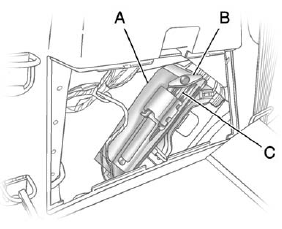
A. Tool Bag
B. Wing Bolt
C. Jack
2. Remove the wing bolt (B) by turning it counterclockwise.
3. Push the jack (C) up out of the holding bracket and remove the tool bag (A).
4. Turn the jack on its side, with the bottom facing toward you.
5. Pull the jack straight out, bottom first.
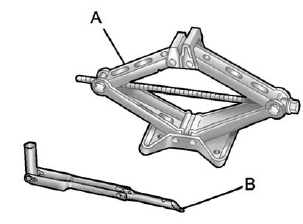
A. Jack
B. Wrench (Three-Piece Shown, One-Piece Similar)
The tools you will be using include the jack (A) and wrench (B).
See also:
Headlamp High/ Low-Beam Changer
(Headlamp High/Low Beam Changer): To change the headlamps from low to high beam, push the lever toward the instrument panel. To return to low-beam headlamps, pull the multifunction lever toward you. ...
Where to Put the Restraint
According to accident statistics, children and infants are safer when properly restrained in a child restraint system or infant restraint system secured in a rear seating position.
We recommend that ...
Engine Overheating
If the vehicle has the Duramax® Diesel engine, see the Duramax Diesel Supplement for more information.
The vehicle has several indicators to warn of engine overheating.
There is a coolant temperatu ...