


Heated and Ventilated Seats
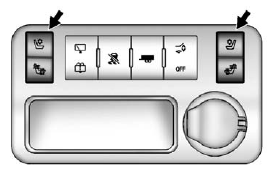
Heated and Cooled Seat Buttons Shown, Heated Seat Buttons Similar
If available, the buttons are on the center console. To operate, the engine must be running.
 : If available, press to heat the seatback only.
 : If available, press to cool the entire seat.
 : Press to heat the seat and seatback.
Press the button once for the highest setting. With each press of the button, the seat will change to the next lower setting, and then to the off setting. The lights indicate three for the highest setting and one for the lowest.
See Heated and Ventilated Front Seats on page 3‑9 for more information.
See also:
Head Restraints
The vehicle's front seats have adjustable head restraints in the outboard seating positions.
WARNING
With head restraints that are not installed and adjusted properly, there is a greater chance that ...
Cleaning the Mirror
Do not spray glass cleaner directly on the mirror. Use a soft towel dampened
with water. ...
What to Use
Read the manufacturer's instructions before refilling the windshield washer fluid.
If operating the vehicle in an area where the temperature may fall below freezing,
use a fluid that has suffi ...