


Power Seats
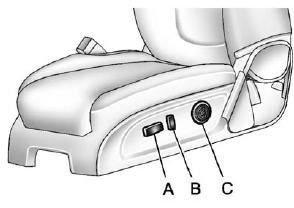
Power Seats
A. Seat Adjustment Control
B. Seatback Control
C. Lumbar Control
To adjust a power seat, if equipped:
• Move the seat forward or rearward by sliding the control (A) forward or rearward.
• Raise or lower the entire seat by moving the control (A) up or down.
• Adjust the seatback by tilting the top of the control (B) forward or rearward.
See Reclining Seatbacks on page 3‑5.
• Increase or decrease lumbar support by pressing the front or rear of the control (C).
See Lumbar Adjustment on page 3‑4.
See Power Seat Adjustment on page 3‑4 for more information.
See also:
Security
OnStar provides services like Stolen Vehicle Assistance, Remote Ignition Block,
and Roadside Assistance, if the vehicle is equipped with these services. OnStar
can unlock the vehicle doors remotel ...
Safety Belt Use During Pregnancy
Safety belts work for everyone, including pregnant women. Like all occupants, they are more likely to be seriously injured if they do not wear safety belts.
A pregnant woman should wear a lap-shoul ...
Footnotes — Maintenance Schedule Additional Required Services — Severe
a) Extreme service. For vehicles mainly driven off-road in four-wheel drive or used in farming, mining, forestry, Department of Natural Resources (DNR), or snow plowing.
b) Check all fuel and vapor l ...