


Manual Seats
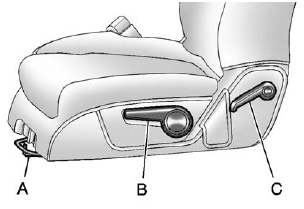
Manual Seats
A. Seat Adjustment Handle
B. Driver Seat Height Adjustment Lever
C. Seatback Lever
To adjust a manual seat:
1. Lift the handle (A) under the seat to unlock it.
2. Slide the seat to the desired position, and then release the handle.
3. Try to move the seat back and forth to be sure it is locked in place.
Move the lever (B) up or down to raise or lower the seat.
Use the lever (C) to adjust the seatback.
See Seat Adjustment on page 3‑3 and Reclining Seatbacks on page 3‑5 for more information.
See also:
Filling the Tank
If the vehicle has a diesel engine, see the Duramax diesel supplement for more information.
WARNING
Fuel vapor burns violently and a fuel fire can cause bad injuries.
To help avoid injuries to you ...
Lap-Shoulder Belt
All seating positions in the vehicle have a lap-shoulder belt.
The following instructions explain how to wear a lap-shoulder belt properly.
1. Adjust the seat, if the seat is adjustable, so you can ...
Introduction
The names, logos, emblems, slogans, vehicle model names, and vehicle body designs appearing in this manual including, but not limited to, GM, the GM logo, GMC, the GMC Truck Emblem, ACADIA, and DE ...