


Passenger Compartment Air Filter
The filter removes dust, pollen, and other airborne irritants from outside air that is pulled into the vehicle.
The filter should be replaced as part of routine scheduled maintenance. See Maintenance Schedule on page 11‑3 for replacement intervals. To find out what type of filter to use, see Maintenance Replacement Parts on page 11‑14.
The passenger compartment air filter can be accessed by removing the entire glove box.
1. Open the glove box completely and locate the stop tab on top of the glove box door.
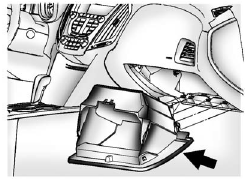
2. Push the stop tab upwards until the stop tab is under the instrument panel
assembly and the glove box is released.
3. Unsnap the tabs beneath the glove box that connects it to the bottom of the instrument
panel assembly.
4. Remove the glove box.
5. Locate the service door for the passenger compartment air filter.
6. Push the two tabs upwards and release the latches holding the service door. Lift
the service door.
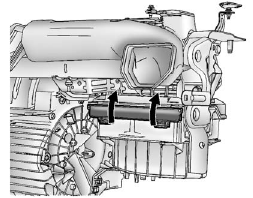
7. Remove the old air filter.
8. Install the new air filter.
9. Close the service door and latches.
10. Re-install the glove box.
See your dealer if additional assistance is needed.
See also:
Securing the Child Within the Child Restraint
WARNING
A child can be seriously injured or killed in a crash if the child is not properly secured in the child restraint. Secure the child properly following the instructions that came with that chi ...
Manual Transfer Case
The transfer case shift lever is on the floor to the right of the driver.
Use this lever to shift into and out of Four-Wheel Drive.
A Four-Wheel Drive indicator light comes on when you shift int ...
Infants and Young Children
Everyone in a vehicle needs protection! This includes infants and all other children.
Neither the distance traveled nor the age and size of the traveler changes the need,
for everyone, to use sa ...