


Turn and Lane-Change Signals
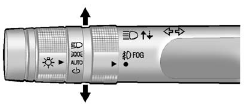
An arrow on the instrument panel cluster will flash in the direction of the turn or lane change.
Move the lever all the way up or down to signal a turn.
Raise or lower the lever until the arrow starts to flash to signal a lane change. Hold it there until the lane change is complete. If the lever is briefly pressed and released, the turn signal flashes three times.
The lever returns to its starting position when it is released.
If after signaling a turn or a lane change the arrows flash rapidly or do not come on, a signal bulb may be burned out.
Have the bulbs replaced. If the bulb is not burned out, check the fuse; see Fuses on page 10‑38 for more information.
See also:
Tires
Use a stiff brush with tire cleaner to clean the tires.
Notice: Using petroleum-based tire dressing products on the vehicle may damage the paint finish and/or tires. When applying a tire dressing, al ...
Entering the Feature Settings Menu
1. Turn the ignition on and place the vehicle in P (Park).
To avoid excessive drain on the battery, turn the headlamps off.
2. Press the customization button to scroll through the available customiz ...
Shoulder Belt Height Adjuster
The vehicle has a shoulder belt height adjuster for the driver and right front
passenger seating positions.
Adjust the height so the shoulder portion of the belt is on the shoulder and
not fallin ...