


Windshield Wiper/Washer
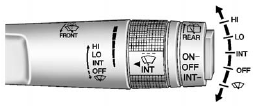
The windshield wiper/washer lever is located on the right side of the steering column. With the ignition in ACC/ACCESSORY or ON/RUN/ START, move the windshield wiper lever to select the wiper speed.
HI: Use for fast wipes.
LO: Use for slow wipes.
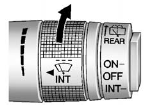
INT: (Intermittent Wipes): Move the lever up to INT for intermittent wipes, then
turn the band up for more frequent wipes
or down for less frequent wipes.
band up for more frequent wipes
or down for less frequent wipes.
 Use to turn the wipers off.
 For a single wipe, briefly move
the wiper lever down. For several wipes, hold the wiper lever down.
For a single wipe, briefly move
the wiper lever down. For several wipes, hold the wiper lever down.
 FRONT (Windshield Washer): Pull
the windshield wiper lever toward you to spray windshield washer fluid and activate
the wipers. The wipers will continue until the lever is released or the maximum
wash time is reached. When the windshield wiper lever is released, additional wipes
may occur depending on how long the windshield washer had been activated. See Washer
Fluid on page 10‑23 for information on filling the windshield washer fluid reservoir.
FRONT (Windshield Washer): Pull
the windshield wiper lever toward you to spray windshield washer fluid and activate
the wipers. The wipers will continue until the lever is released or the maximum
wash time is reached. When the windshield wiper lever is released, additional wipes
may occur depending on how long the windshield washer had been activated. See Washer
Fluid on page 10‑23 for information on filling the windshield washer fluid reservoir.
WARNING
In freezing weather, do not use the washer until the windshield is warmed. Otherwise the washer fluid can form ice on the windshield, blocking your vision.
Clear snow and ice from the wiper blades before using them. If frozen to the windshield, carefully loosen or thaw them. Damaged blades should be replaced. See Wiper Blade Replacement on page 10‑28.
Heavy snow or ice can overload the wiper motor.
See also:
What to Use
WARNING
Adding only plain water or some other liquid to the cooling system can be dangerous.
Plain water and other liquids, can boil before the proper coolant mixture will.
The coolant warning sy ...
Reclining Seatbacks
Manual Reclining Seatbacks
To recline a manual seatback:
1. Lift the lever.
2. Move the seatback to the desired position, and then release the lever to lock
the seatback in place.
3. Push and ...
Radio Frequency Identification (RFID)
RFID technology is used in some vehicles for functions such as tire pressure monitoring and ignition system security, as well as in connection with conveniences such as key fobs for remote door lockin ...