


Split Folding Seatbacks
With this feature, either side of the rear seatback can be folded down for more cargo space.
WARNING
If either seatback is not locked, it could move forward in a sudden stop or crash. That could cause injury to the person sitting there. Always push and pull on the seatbacks to be sure they are locked.
A safety belt that is improperly routed, not properly attached, or twisted will not provide the protection needed in a crash. The person wearing the belt could be seriously injured. After raising the rear seatback, always check to be sure that the safety belts are properly routed and attached, and are not twisted.
To fold the seatback down:
Notice: Folding a rear seat with the safety belts still fastened may cause damage to the seat or the safety belts. Always unbuckle the safety belts and return them to their normal stowed position before folding a rear seat.
1. Unbuckle the rear safety belts and place the front seatbacks in the upright position. See Reclining Seatbacks on page 3‑5.
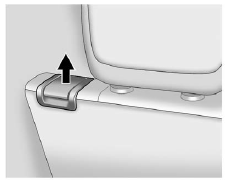
2. Lift the lever on the top of the seatback.
3. Fold the seatback forward. The filler panel behind the seat will fold with the seatback to span the gap between the rear of the seat and the cargo area, creating a flat load floor. Do not lift the filler panel.
Keep the seatback in the upright, locked position when not in use. To recline the seatback:
1. Lift and hold the lever on top of the seatback.
2. Tilt the seatback rearward, then release the lever when the seatback is in the desired position.
To slide the entire seat forward or rearward:
1. Lift and hold the release bar under the front of the seat cushion to unlock the seat.
2. Slide the seat to the desired position.
3. Release the bar.
4. Try to move the seat back and forth to ensure the seat is locked into place.
See also:
Engine Coolant
The cooling system in the vehicle is filled with DEX-COOL® engine coolant. The coolant is designed to remain in the vehicle for 5 years or 240 000 km (150,000 mi), whichever occurs first.
The follow ...
Engine Compartment Fuse Block
The underhood fuse block is located in the engine compartment, on the passenger side of the vehicle.
Lift the cover for access to the fuse/relay block.
Notice: Spilling liquid on any electrical co ...
Canceling a Remote Start
To cancel a remote start:
• Aim the RKE transmitter at the vehicle and press and hold
until the parking lamps turn off.
• Turn on the hazard warning flashers.
• Turn the ignition switch on ...