


Lumbar Adjustment
Power Lumbar
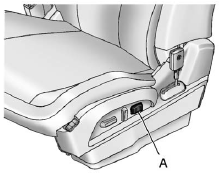
Eight-Way Power Seat Shown, Four-Way Similar
A. Lumbar Switch
If available, press and hold the front or rear of the switch (A) to increase or decrease lumbar support. Release the switch when the seatback reaches the desired level of lumbar support.
See also:
What to Use
Read the manufacturer's instructions before refilling the windshield washer fluid.
If operating the vehicle in an area where the temperature may fall below freezing,
use a fluid that has suffi ...
Lane Departure Warning (LDW)
For vehicles with LDW, it is intended to help avoid unintentional lane departures.
It may provide a warning if the vehicle is crossing a lane without using a turn
signal. LDW uses a camera sensor ...
Heavy Duty Crew Cab Only
This vehicle has airbags. A rear seat is a safer place to secure a forward-facing child restraint. See Where to Put the Restraint on page 3‑49.
A label on the sun visor says, “Never put a rea ...