


Lane Departure Warning (LDW)
For vehicles with LDW, it is intended to help avoid unintentional lane departures. It may provide a warning if the vehicle is crossing a lane without using a turn signal. LDW uses a camera sensor to detect the lane markings. It only operates at speeds of 56 km (35 mph) or greater.
The LDW indicator, @, appears green if a lane marking is detected. It changes to amber, flashes, and sounds three chimes if the vehicle crosses a detected lane marking without using the turn signal.
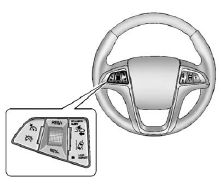
To turn LDW on and off, press the LANE DEPART button, located on the steering wheel.
See Lane Departure Warning (LDW) on page 9‑48 for more information.
See also:
Voltmeter Gauge
When the engine is not running, but the ignition is turned on, this gauge shows the battery's state of charge in DC volts.
When the engine is running, this gauge shows the condition of the charging ...
California Perchlorate Materials Requirements
Certain types of automotive applications, such as airbag initiators, seat belt pretensioners, and lithium batteries contained in Remote Keyless Entry transmitters, may contain perchlorate materials.
...
Fuel Additives
To provide cleaner air, all gasolines in the United States are now required to contain additives that help prevent engine and fuel system deposits from forming, allowing the emission control system to ...