


Trailer Brake Control Panel
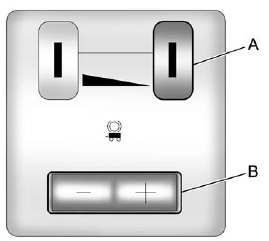
A. Manual Trailer Brake Apply Lever
B. Trailer Gain Adjustment Buttons
The ITBC system has a control panel located on the instrument panel to the left of the steering column. See Instrument Panel (Base/Uplevel Version) on page 1‑2 or Instrument Panel (Premium Version) on page 1‑6 for more information. The control panel allows adjustment to the amount of output, referred to as trailer gain, available to the electric trailer brakes and allows manual application of the trailer brakes. The Trailer Brake Control Panel is used along with the Trailer Brake Display Page on the DIC to adjust and display power output to the trailer brakes.
See also:
Video Screen Input Jack
Each video screen is equipped with a video input jack to allow video cables to
be connected from an auxiliary device such as a camcorder or a video game system.
This signal will override any video ...
Fog Lamps
To replace one of these bulbs:
1. Locate the fog lamp assembly under the front facia.
2. Disconnect the bulb socket from the electrical connector, turn, and pull out
the bulb assembly.
3. Remov ...
Steering Wheel Adjustment
To adjust the steering wheel:
1. Pull the lever (A) down.
2. Move the steering wheel up or down.
3. Pull or push the steering wheel closer or away from you.
4. Pull the lever (A) up to lock the ...