


Memory Features
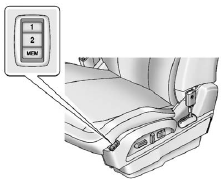
On vehicles with the memory feature, the “1” and “2” buttons on the outboard side of the driver seat are used to manually save and recall the driver seat and outside mirror positions. These manually stored positions are referred to as Button Memory positions.
The vehicle will also automatically save driver seat and outside mirror positions to the current driver Remote Keyless Entry (RKE) transmitter when the ignition is turned off. These automatically stored positions are referred to as RKE Memory positions.
Storing Button Memory Positions To save positions into Button Memory:
1. Adjust the driver seat, seatback recliner, and both outside mirrors to the
desired driving positions.
2. Press and hold MEM (Memory) and “1” at the same time until a beep sounds.
3. Repeat Steps 1 and 2 for a second driver using “2.”
To recall the manually saved Button Memory positions, press and hold “1” or “2.” The driver seat and outside mirrors move to the positions stored to those buttons when pressed. Releasing “1” or “2” before the stored positions are reached stops the recall.
To automatically recall RKE Memory positions, unlock the driver door with the
RKE transmitter and open the driver door. If the driver door is already open, pressing
the RKE transmitter  button will also
activate the RKE Memory recall. The driver seat and outside mirrors will move to
the previously saved RKE Memory positions.
button will also
activate the RKE Memory recall. The driver seat and outside mirrors will move to
the previously saved RKE Memory positions.
See Memory Seats on page 3‑7 for more information.
Easy Exit Driver Seat
This feature moves the seat rearward allowing the driver more room to exit the vehicle.
To activate, turn the ignition off and open the driver door. If the driver door is already open, turning the ignition off will activate the easy exit driver seat.
This feature can be turned on or off using the vehicle personalization menu. See Vehicle Personalization on page 5‑33 for more information.
See also:
Instantaneous Economy and Active Fuel Management™ Indicator
If the vehicle has this display, press the trip/fuel button until INST ECON V8 displays. This display shows the current fuel economy at a particular moment and will change frequently as driving condit ...
Infotainment
Determine which radio the vehicle has and read the following pages to become familiar with its features.
WARNING
Taking your eyes off the road for extended periods could cause a crash resulting in i ...
Engine Cooling System Messages
ENGINE HOT A/C (Air Conditioning) OFF
This message displays when the engine coolant becomes hotter than the normal operating temperature.
See Engine Coolant Temperature Gauge on page 5‑14. To ...